Accounting documents, figured out.
Turn accounting documents into accurate QuickBooks data.
FigureIQ extracts accounting data from invoices, receipts, and statements, checks the results with a separate AI, shows your team the source evidence, and helps publish clean data into QuickBooks Online.
Start with 100 free pages
See how it worksNo credit card required · 100 free pages never expire
99%+benchmarked pipeline accuracy*
AI Judgechecks extracted results
QBO + Google Driveconnected workflow
1 page = 1 creditsimple, predictable billing
End-to-end workflow
One clear path from document to QuickBooks data.
Bring in the document, extract the accounting data, let AI check the result and categorize it using QuickBooks context, verify what matters, route it for approval if needed, and publish.
- 1
Capture
Direct upload or Google Drive.
- 2AAI pipeline
Extract
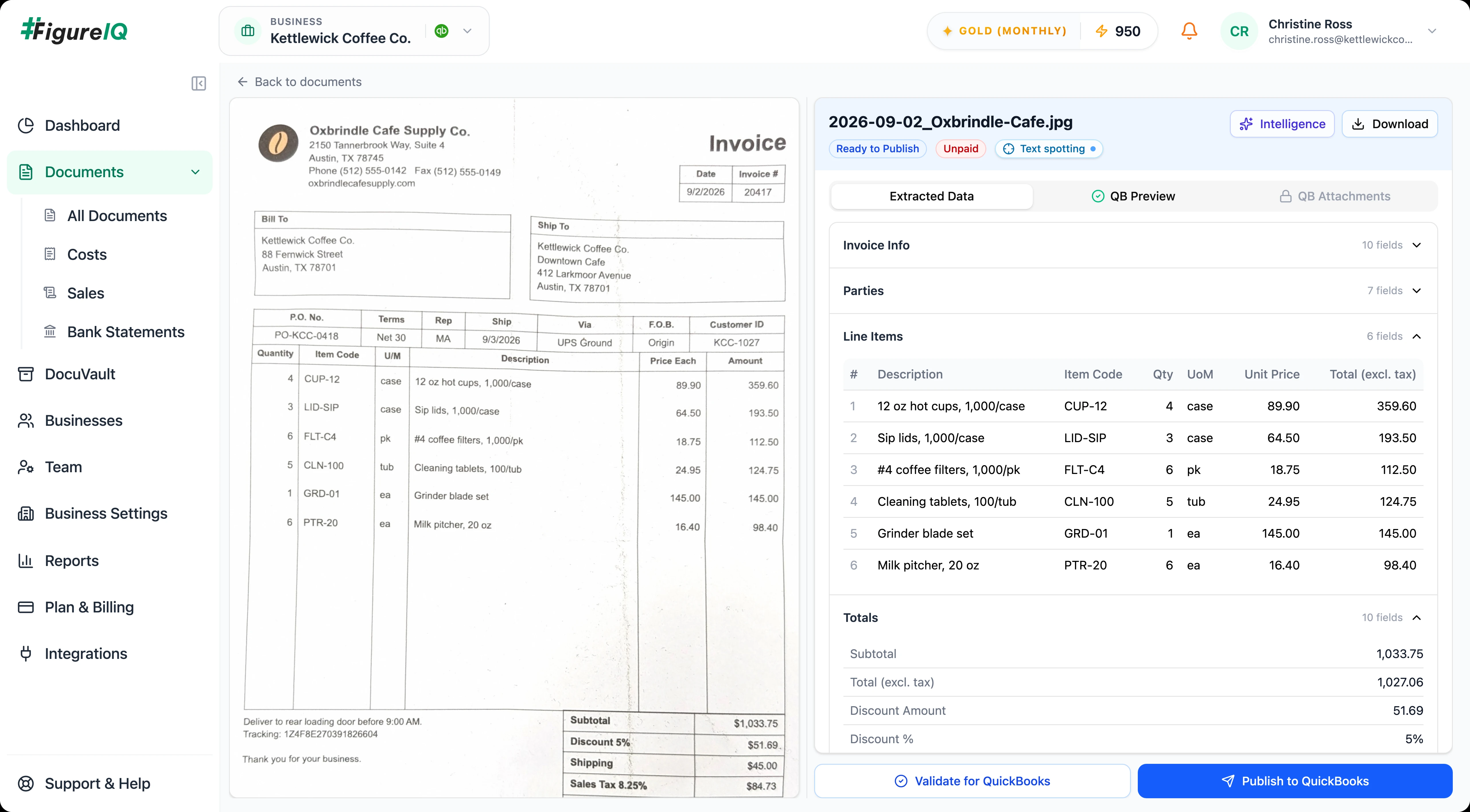
Header fields, parties, detailed line items, tax, and totals.
- 2BAI pipeline
AI Judge
AI Judge reviews the extraction.
- 2CAI pipeline
Categorize
QBO expense accounts provide context for account recommendations.
- 3
Verify (Optional)
See exactly where each extracted value appears in the original document.
- 4
Approve (Optional)
Use an optional approval workflow.
- 5
Publish to QBO
Send validated data to QuickBooks Online.
Start with 100 free pages
Try it on the documents your team already handles.
Who it's for
Built for the way your accounting team works.
FigureIQ supports both accounting practices and in-house teams. Choose the path that best matches your role.
For accounting practice owners
Grow client capacity without growing the data-entry burden.
Add more client work without letting document-processing effort, review effort, and software complexity grow at the same pace.
Explore for practice ownersFor CAS & bookkeeping leaders
Increase client throughput and reduce review effort.
Standardize the document workflow across clients while giving reviewers better evidence and fewer routine fields to recheck.
Explore for CAS teamsFor controllers & accounting leaders
Get clean QBO data without weakening accounting control.
Reduce manual data entry and source checking while keeping validation, review, and deliberate publication in the workflow.
Explore for in-house accounting teamsWhy FigureIQ
AI you can check - not just trust.
FigureIQ combines a separate AI Judge layer, text spotting, and human-readable decision explanations so your team can move faster without giving up visibility.
AI extraction check
A separate AI checks the extraction.
After the initial extraction, FigureIQ runs a second AI Judge step to identify potential issues before the data moves downstream.
Source verification
See exactly where a value came from.
Hover over an extracted value and FigureIQ highlights the matching region on the source document.
Decision explanations
Understand why the AI made the recommendation.
Review concise human-readable explanations for extraction and expense-categorization decisions.
Accuracy + quality controls
High accuracy starts before extraction - and continues after it.
FigureIQ combines document-quality screening, extraction, AI Judge review, and accounting consistency checks into one pipeline.
benchmarked pipeline accuracy
Benchmarked on public and proprietary datasets using a defined methodology.
Read benchmark methodologyAccounting consistency check
Total does not match item-level detail
Needs review- Expected
- $18.40
- Extracted total
- $19.40
Reviewer corrects before publishing
Resolved- Expected
- $18.40
- Transaction total
- $18.40
- Catch discrepancies before they become ledger cleanup.
- Tax and total discrepancies against the line items are surfaced for a reviewer to resolve.
QuickBooks-connected workflow
Built around the accounting system you already use.
FigureIQ uses QuickBooks Online context to support expense categorization, lets your team review the transaction, and publishes the validated result back to QBO.
QBO context
Pull expense accounts to support expense categorization.
QBO publication
Publish validated transactions to the connected QuickBooks Online account.
Google Drive
Bring documents in directly from Google Drive.
Direct upload
Upload invoices, receipts, and statements.
Historical FX
For QBO setups without multicurrency, automatically convert foreign transaction values using the historical rate for the transaction date.
Supporting attachments
Add related documents such as purchase orders or memos after publication so they are available in FigureIQ and QBO.
Page-based pricing
Simple pricing that is easy to explain.
One processed page = one credit. No different credit rules for document types or detailed line items.
No client limitNo team-size limitNo line-item limitNo special bank-statement quota1 page = 1 credit
Free
$0
100 pages
- No credit card required
- Free pages never expire
Bronze
$150/ month
1,000 pages / month
- Monthly subscription
- Subscription pages expire at the end of the billing cycle
Rolling monthly · No long-term contract
Silver
$340/ month
2,500 pages / month
- Monthly subscription
- Subscription pages expire at the end of the billing cycle
Rolling monthly · No long-term contract
Gold
$650/ month
5,000 pages / month
- Monthly subscription
- Subscription pages expire at the end of the billing cycle
Rolling monthly · No long-term contract
Top-up
500 pages · $95
- Buy as many blocks as needed
- Top-up pages never expire
Annual billing available · Save 10% with 12-month prepayment
See full pricing & billing details →Security + operational controls
Built for real accounting work.
FigureIQ combines automation with the access controls, storage, retention, privacy, and support expected from professional accounting software.
Identity and Access Management
Users, roles, and permissions.
Optional approval workflow
Users can submit work for approval before publishing. Only authorized approvers can approve it.
DocuVault
Secure document storage with flexible folder structures.
7-year minimum retention
Long-term data retention for accounting records.
Privacy & cybersecurity
CCPA compliance and robust data-security/cybersecurity measures.
In-app support
Enterprise-grade ticketing built into the application.
Review the details behind FigureIQ's approach to protecting accounting information.
Read the FigureIQ security summaryFAQ
Questions before you try FigureIQ
What kinds of documents can FigureIQ process?
Invoices, receipts, and bank-statement pages across varied formats and layouts. Detailed line items are included without a separate line-item restriction.
Does FigureIQ connect to QuickBooks Online?
Yes. FigureIQ can pull vendors, customers, tax codes and expense accounts from QBO, and publish validated transactions back to the connected QBO account.
How accurate is FigureIQ?
The combined extraction + AI Judge pipeline has achieved 99%+ benchmarked pipeline accuracy.
Read the benchmark methodology →What happens if the AI is wrong?
FigureIQ uses a separate AI Judge and accounting consistency checks to flag potential issues. Your team can trace extracted values back to the source document, correct any errors, and - if enabled - route the transaction through an internal approval workflow before publishing.
Do I need to create document templates?
No. FigureIQ is designed to adapt to varied document formats and layouts without requiring template configuration.
What happens to blank or rotated pages?
Rotated pages are corrected before extraction. Blank and non-informative pages are skipped before processing and are not charged.
Is FigureIQ an AP payment system?
No. FigureIQ focuses on document capture, extraction, categorization, validation, review, storage, and QBO publishing. It does not currently provide payment execution.
Does FigureIQ support expense reimbursements, mileage, duplicate detection, or bank reconciliation?
Those capabilities are not currently part of the product.
Do I need a credit card to start?
No. The Free Plan includes 100 pages, requires no credit card, and those free pages do not expire.
How does pricing work?
One processed page equals one credit regardless of document type. Bronze, Silver, and Gold pages expire monthly; free and top-up pages do not.
See full pricing & billing details →How long is data retained?
FigureIQ guarantees a minimum 7-year retention period, subject to the formal policy and terms.
See it on your documents
Try FigureIQ on 100 real accounting pages.
The fastest way to understand the product is to run the invoices, receipts, or statements your team already handles and review the results yourself.
Start with 100 free pages
No credit card required · Free pages never expire