More capacity per reviewer
Automate routine extraction and checks so senior staff can focus on judgment calls.
For CAS & bookkeeping teams
FigureIQ turns client invoices, receipts, and statements into validated, categorized QuickBooks Online entries - so your team spends less time on manual data entry and routine checks.
100 free pages. They never expire. No credit card required.
Reduce review workload
Your senior staff should be reviewing judgment calls and exceptions - not reopening every document to verify routine fields or doing avoidable data-entry work.
Automate routine extraction and checks so senior staff can focus on judgment calls.
Give each client a dedicated workspace and QBO connection so documents and accounting context stay organized in one place.
No templates or special rules for line-item-heavy invoices and bank-statement pages. A workflow that feels obvious from day one.
Client documents to QBO
Keep each client’s documents, accounting context, and QuickBooks connection separate - while your team follows the same simple process every time.
Client Workspace
Google Drive / Upload
Extract + Categorize + Validate
Review (Optional)
Publish to QBO
Pull vendors, customers, tax codes and expense accounts from each client's QBO.
Extract detailed line items without a separate line-item quota.
Add supporting attachments after publishing to QBO.
Try the workflow on the client documents your team already handles. No credit card required.
A second check, built in
FigureIQ combines document extraction with a separate AI Judge and a page-quality classifier, so the system checks the work before your team does.
View benchmark methodologyA separate AI pass reviews extracted results before they move downstream.
Clear pages flow through. Rotated pages are corrected. Noisy pages are processed with a warning.
Blank and non-informative pages are filtered out before processing and are not charged.
*The 99%+ figure refers to the benchmarked extraction + AI Judge pipeline. The exact benchmark set and scoring method are documented separately in the benchmark methodology.
Source verification
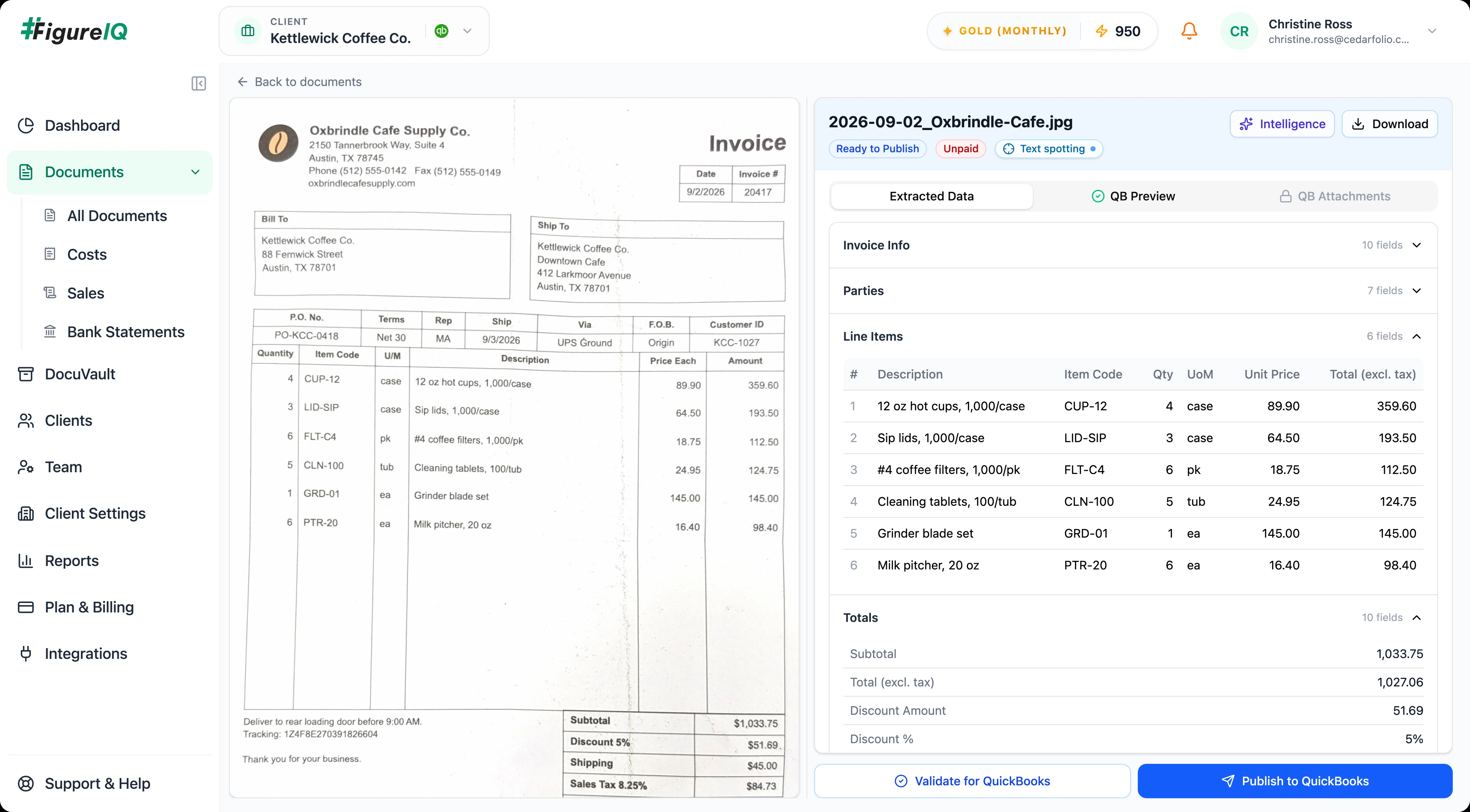
Verify where a value came from, understand why the AI made a decision, and catch accounting inconsistencies without reopening the document in another tool.
Hover over a field and see the exact region of the source page it came from.
Give reviewers a concise rationale for extraction and expense-categorization decisions.
Flag issues such as tax or total inconsistencies before the transaction is published.
Put your own difficult documents through it. No credit card required.
Practice-wide workflow
Separate client contexts, role-based permissions, an optional approval workflow, and long-term document storage give your practice one consistent operating model across all client engagements.
Keep each client’s documents, QBO connection, and secure storage scoped to that client.
Admins can enable this workflow so users can submit extracted data for approval. Only authorized approvers can approve it before publishing.
Manage users, roles, and permissions centrally as the practice grows.
Store accounting documents in secure folders with whatever folder structure fits your internal process.
Multiple QBO accounts - one per client
Historical FX conversion when the client’s QBO setup requires it
Additional supporting attachments synchronized after QBO publication
Built-in support ticketing
Page-based pricing
Pay for pages - not clients, users, line items, or document types. One processed page is one credit.
Pricing at a glance
1 page = 1 credit
Free
$0
100 pages
Bronze
$150/ month
1,000 pages / month
Rolling monthly · No long-term contract
Silver
$340/ month
2,500 pages / month
Rolling monthly · No long-term contract
Gold
$650/ month
5,000 pages / month
Rolling monthly · No long-term contract
Need more this month?
Add 500 pages for $95. Buy as many blocks as needed. Top-up pages never expire.
No need to choose a paid plan before you see how FigureIQ handles your documents. No credit card required.
Annual billing available · Save 10% with 12-month prepayment
See full pricing & billing details →Security + operational controls
FigureIQ is built with the access controls, client separation, retention, support, privacy, and security practices expected of professional accounting software.
Identity and access management (IAM) for users, roles, and permissions.
Workspaces and secure DocuVault folders are client-specific.
CCPA and applicable privacy-law commitments.
Minimum 7-year guaranteed data-retention period, subject to formal policy/terms.
Enterprise-grade ticketing inside the application.
Robust cybersecurity measures for professional accounting workflows.
Questions, answered
Invoices, receipts, bank-statement pages, and other accounting documents in varied layouts. FigureIQ extracts detailed line items without a separate line-item quota.
Yes. Each client can have its own QBO connection. FigureIQ pulls vendors, customers, tax codes and expense accounts, and publishes processed transactions back to the correct client account.
Yes. FigureIQ provides client-specific workspaces and client-scoped DocuVault storage.
No. Pricing is page-based rather than client-count or team-size based.
No. One processed page is one credit. There is no separate line-item or bank-statement restriction.
Blank and non-informative pages are filtered before processing and are not charged. Noisy pages are processed with a warning, and rotated pages are corrected before extraction.
Yes. Admins can enable this workflow so users can submit extracted data for approval. Only authorized approvers can approve it before publishing.
Text spotting shows exactly where each extracted field appears on the source page. AI decision explanations provide concise context for extraction and expense-categorization decisions.
Direct upload and Google Drive are currently supported. Email-in and mobile capture are planned but not yet available.
The 100 Free Plan pages do not expire. Bronze/Silver/Gold monthly page allocations expire at the end of each billing period. Top-up pages never expire.
FigureIQ guarantees a minimum 7-year data-retention period, subject to the formal policy/terms.
View policy and terms →A practical first step
The fastest way to know whether it fits your practice is to run the invoices, receipts, and statements your team already handles - and judge the results for yourself.
Start with 100 free pagesYour 100 free pages never expire. No credit card required.