Manual data entry01
Before
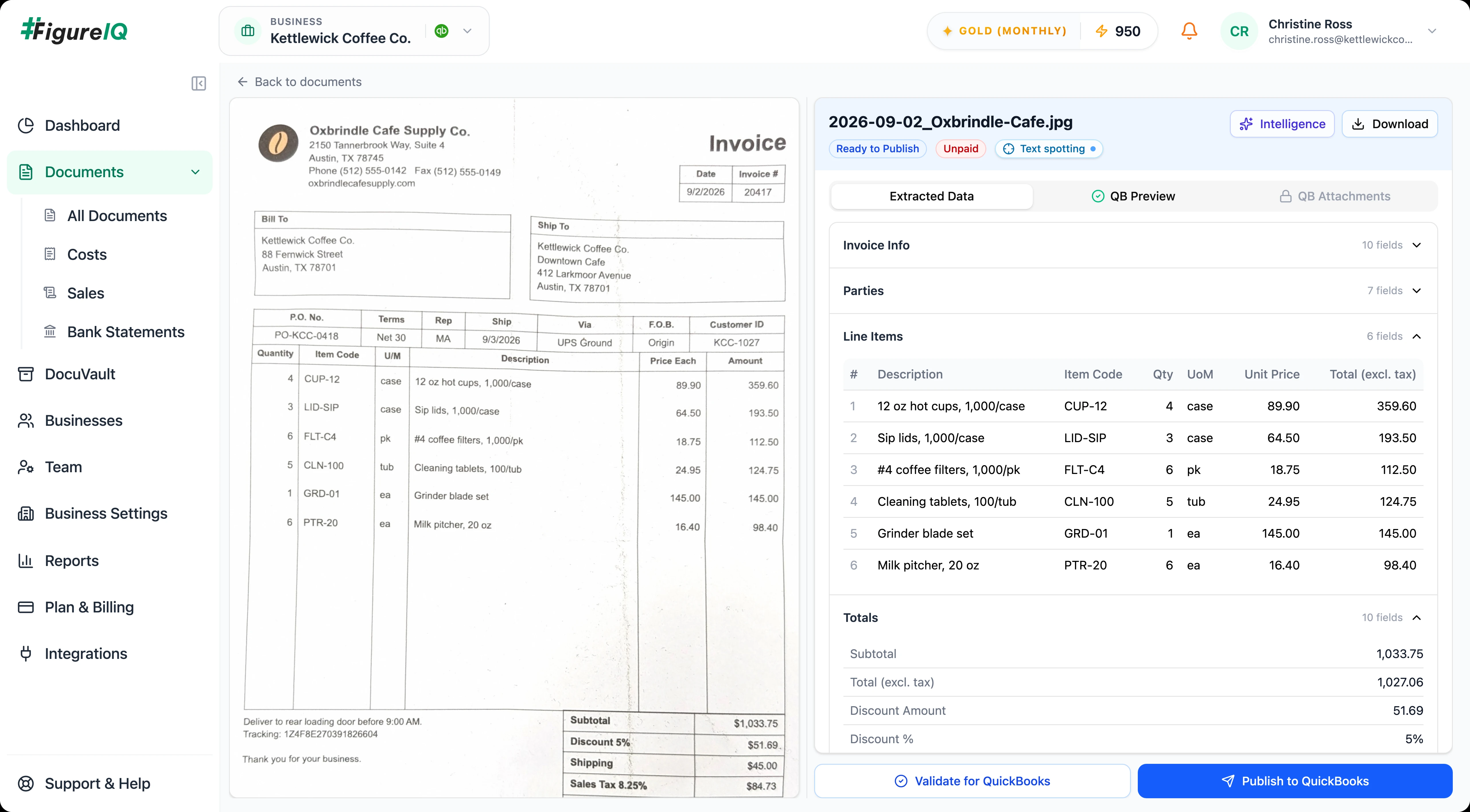
Staff manually enter vendor, tax, expense account, currency, and line-item data.
With FigureIQ
Structured accounting data is extracted automatically, including detailed line items.
For controllers & accounting leaders
FigureIQ turns invoices, receipts, and statements into structured accounting data, checks the extraction, surfaces inconsistencies, and helps your team publish confidently to QuickBooks Online.
No credit card required · 100 free pages never expire
Month-end friction
FigureIQ turns document chaos into a controlled accounting flow: clean data, visible exceptions, traceable sources, and QBO-ready entries.
Before
Staff manually enter vendor, tax, expense account, currency, and line-item data.
With FigureIQ
Structured accounting data is extracted automatically, including detailed line items.
Before
Reviewers reopen the invoice and visually hunt for the field they need to confirm.
With FigureIQ
Text spotting shows where each extracted value appears on the source page.
Before
Rotated, blank, or noisy pages create avoidable processing errors.
With FigureIQ
Pages are classified before extraction; rotated pages are corrected, blanks are skipped, and noisy pages are flagged.
Before
Tax and total discrepancies surface late, creating rework.
With FigureIQ
Consistency checks surface issues before QBO publication.
Before
Source documents and related attachments can become scattered across drives and folders.
With FigureIQ
DocuVault and QBO attachments provide structured places for evidence and related documentation.
Controlled document-to-QBO workflow
Bring in a document, extract the accounting detail, resolve exceptions, submit for approval when required, and publish only when the transaction is ready.
Vendors, customers, tax codes, and expense accounts are pulled from QBO for accounting context.
Detailed line items are included without a separate line-item quota.
Related supporting attachments can be added after QBO publication.
Historical FX handling is available when the QBO setup does not support multicurrency.
Run it alongside your existing process · No credit card required
Accuracy + quality controls
FigureIQ does not stop at extraction. A separate AI Judge evaluates the result, while a page-quality classifier deals with bad inputs before they become downstream accounting work.
Read benchmark methodologySource verification
See exactly where a value came from, understand the model's human-readable rationale, and catch accounting inconsistencies before the transaction reaches QuickBooks.
Catch discrepancies before they become ledger cleanup.
Put FigureIQ to work on your own accounting documents · No credit card required
QuickBooks workflow
FigureIQ pulls accounting context from QBO to support categorization, lets your team validate the transaction, and publishes the result back when it is ready.
FigureIQ uses your QBO expense accounts to recommend a category for each expense.
When the connected QBO setup does not support multiple currencies, FigureIQ can convert transaction amounts using the historical exchange rate for the transaction date.
After publishing, add related documents such as purchase orders or memos so they remain visible in FigureIQ and QBO.
Import documents from Google Drive or upload them directly.
Team access + accounting controls
Give users the access they need, add an approval step where your accounting policy requires it, and keep source documentation available for later audit and tax work.
Manage users, roles, and permissions so access reflects how the accounting team is organized.
Users can submit work for approval before publishing. Only authorized approvers can approve it.
Store accounting documents in secure folders with whatever folder structure fits your internal process.
Long-term document retention supports audit, tax, and historical record needs.
Enterprise-grade ticketing is built into the application.
CCPA compliance and robust data-security/cybersecurity measures.
IAM and access controls, CCPA compliance, long-term retention, and robust data-security and cybersecurity measures. The security summary sets out how each of these works.
Read the FigureIQ security summaryPage-based pricing
One processed page is one credit - regardless of document type or line-item detail.
Free
$0
100 pages
Bronze
$150/ month
1,000 pages / month
Silver
$340/ month
2,500 pages / month
Gold
$650/ month
5,000 pages / month
Top-up pages
500 extra pages · $95
Buy as many blocks as needed. Top-up pages never expire.
One page = one credit
Blank and non-informative pages filtered before processing are not charged.
Test the workflow before choosing a paid plan · No credit card required
Annual billing available · Save 10% with 12-month prepayment
See full pricing & billing details →Controller FAQ
No. FigureIQ is focused on accounting-document capture, extraction, validation, categorization, review, storage, and QuickBooks Online publishing. It does not currently provide payment execution or a complete AP/payment-management suite.
No. Expense-management and reimbursement workflows are not currently part of FigureIQ.
No. FigureIQ’s approval workflow is optional. An admin can enable it when it fits your internal-control process.
If your organization enables the approval workflow, users can submit work for approval before publishing. Only authorized approvers can approve it. IAM roles and permissions support controlled access.
FigureIQ uses a separate AI Judge and accounting consistency checks to flag potential issues. Your team can trace extracted values back to the source document, correct any errors, and - if enabled - route the transaction through an internal approval workflow before publishing.
Hover over an extracted value to see exactly where it appears on the source page. Reviewers can also inspect concise AI explanations for extraction and categorization decisions.
FigureIQ does not require configuration of document templates, and is designed to adapt across varied document formats and layouts.
Rotated pages are corrected before extraction. Noisy pages are processed with a warning. Blank and non-informative pages are filtered out and not charged.
FigureIQ pulls vendors, customers, tax codes, and expense accounts from QBO, then publishes validated transactions back to the connected QBO account.
When the connected QBO setup does not support multiple currencies, FigureIQ can convert transaction amounts into the company currency using the historical exchange rate for the transaction date.
Yes. After publishing an invoice or receipt, users can add additional supporting attachments such as a memo or purchase order. Those attachments appear in FigureIQ and QBO.
Direct upload and Google Drive are currently supported. Email-in and mobile capture are planned but not yet available.
Duplicate-document detection is not currently available.
FigureIQ can process bank-statement pages, but bank-statement reconciliation is not currently part of the product.
Not currently. Mileage tracking and supplier-statement reconciliation are not part of the present feature set.
No. Create a Free Plan account with 100 pages and no credit card. Those 100 pages do not expire.
Bronze, Silver, and Gold pages expire at the end of the monthly billing cycle. Free pages and purchased top-up pages do not expire.
FigureIQ guarantees a minimum 7-year retention period, subject to the formal policy/terms.
FigureIQ includes IAM, access controls, CCPA compliance, long-term retention, and robust data-security/cybersecurity measures.
Read the security summary →A controlled pilot
Use invoices, receipts, or statements your team already processes. See extraction, AI Judge, human verification, and the QuickBooks workflow in action - while your existing process stays in place.
No credit card required · Free pages never expire