Handle more document volume with the team you already have.
Grow document volume without increasing the manual data-entry burden.
For accounting & bookkeeping practices
FigureIQ turns client invoices, receipts, and statements into validated, categorized QuickBooks Online entries - so your team can spend less time on manual data entry and routine checks.
No credit card required · 100 free pages never expire
Protect your team’s capacity
As client volume grows, routine document entry and checking can quietly consume the capacity you meant to use for higher-value work. FigureIQ is designed to absorb more of that repetitive workload before it reaches your senior staff.
Grow document volume without increasing the manual data-entry burden.
Reduce avoidable manual checks and protect engagement margins.
AI Judge and accounting consistency checks direct attention to the items that need it.
Keep each client’s workspace and QBO context separate.
More capacity, same team
More client volume does not have to create the same growth in manual work.
A complete client workflow
One repeatable workflow for each client: bring in the document, extract the accounting data, let AI check the result and categorize it using QuickBooks context, review if needed, and publish.
Try it on real client documents · No credit card required
Page-based pricing
Pay for pages - not clients, users, line items, or document types.
1 page = 1 credit
$0
100 pages
$150/ month
1,000 pages / month
Rolling monthly · No long-term contract
$340/ month
2,500 pages / month
Rolling monthly · No long-term contract
$650/ month
5,000 pages / month
Rolling monthly · No long-term contract
Top-up
Buy as many blocks as needed
Top-up pages never expire
Annual billing available · Save 10% with 12-month prepayment
See full pricing & billing details →AI extraction check
FigureIQ combines extraction with a separate AI Judge and document-quality classifier, producing 99%+ benchmarked pipeline accuracy.
See benchmark methodologyProtect every credit. Do not spend credits on pages that contain nothing useful.
Useful pages onlyDo not spend credits on pages that contain nothing useful.
Blank and Non-informative pages are skipped and not charged. Rotated pages are corrected; Noisy pages carry a visible warning.
Benchmark evidence
Benchmarked on public and proprietary datasets using a defined methodology.
Source verification
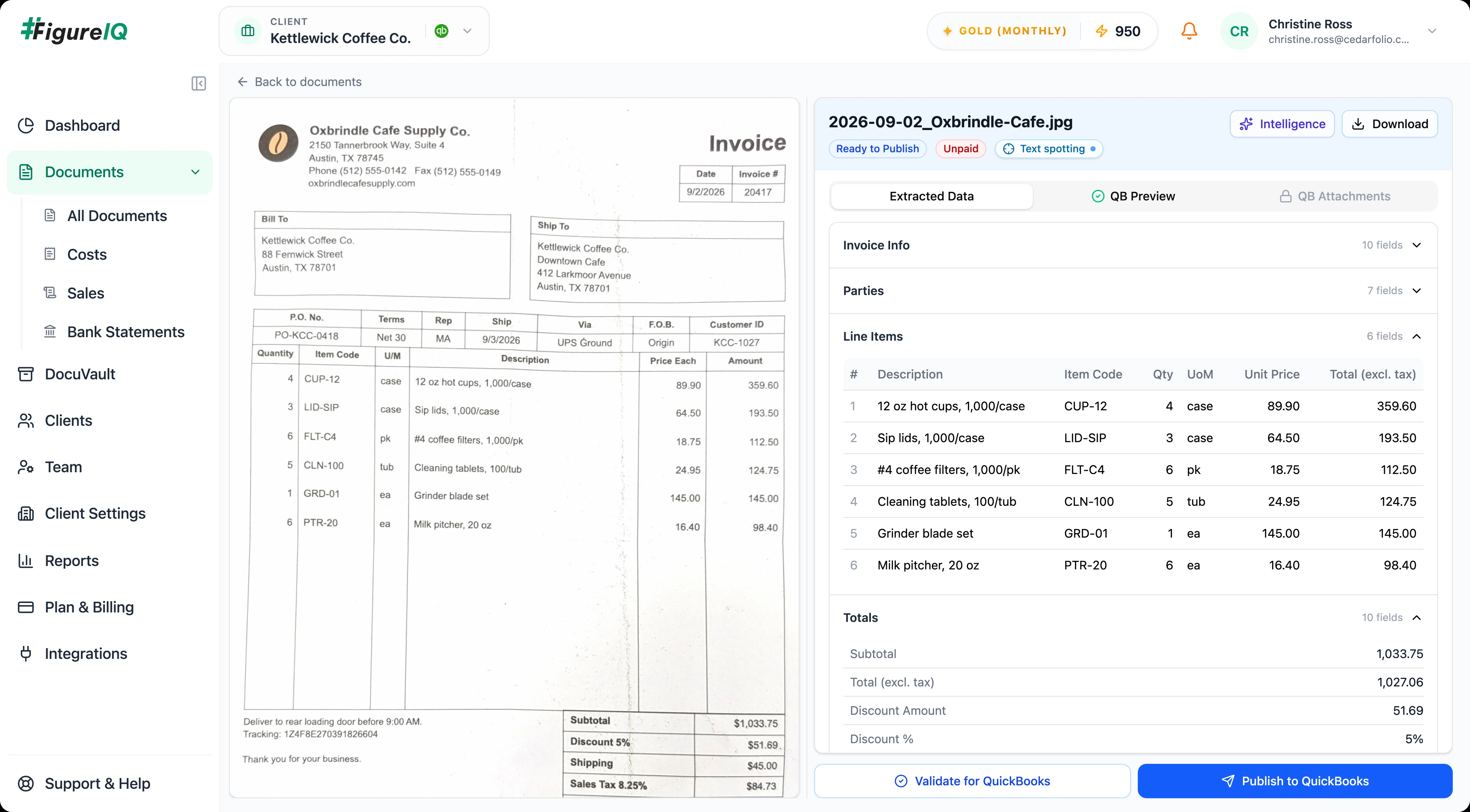
FigureIQ is designed for fast human verification. Reviewers can trace extracted values to the source document, inspect human-readable AI explanations, and resolve accounting inconsistencies before anything is published.
Review faster
See exactly where it came from on the source page.
Read a concise, human-readable AI decision explanation.
See the QBO context behind a suggested expense category.
Identify tax inconsistencies and mismatches between line-item totals and the document total before publishing to QuickBooks.
Accounting consistency check
Needs reviewCatch accounting inconsistencies before they reach QuickBooks.
See how your own documents behave - no credit card required
Practice-wide workflow
Keep client context separate, give team members the right access, and add approval controls only where your firm needs them.
Add clients without adding a new software pricing tier.
Keep documents, accounting context, QBO connections, and secure folders scoped to the correct client.
Pull expense accounts for categorization context, then publish validated transactions back to the correct client’s QBO account.
Admins can enable this workflow so users can submit extracted data for approval. Only authorized approvers can approve it before publishing.
Manage users, roles, and permissions as the practice grows.
After publishing, attach related memos, purchase orders, or other supporting documents so they remain visible in FigureIQ and QBO.
Powerful enough for a growing practice. Simple enough to feel obvious on day one.
No templates to build and no rules for staff to memorize. FigureIQ adapts to varied document layouts, so your team can process documents as they arrive.
Security + operational controls
FigureIQ provides the controls, storage, support, privacy practices, and long-term retention expected from a commercial-grade accounting automation platform.
Users, roles, and permissions for your practice.
Secure document storage for each client, with flexible folder structures.
Guaranteed data retention period of at least 7 years.
CCPA compliance and robust data-security/cybersecurity measures.
Enterprise-grade ticketing built directly into the product.
Users can submit work for approval before publishing. Only authorized approvers can approve it.
Cedarfolio Bookkeeping
Each client stays separate
Example folder structure
Optional document storage
Organize files your way.
Create any folder structure that fits each client’s workflow - or keep using your existing document storage.
FAQ
No. You can create a Free Plan account without providing a credit card. The account includes 100 free pages, and those free pages do not expire.
No. Start with one client or a small set of documents. FigureIQ is designed so you can evaluate it alongside your current workflow before deciding how broadly to adopt it.
It does not. FigureIQ does not impose a client limit or team-size limit. Billing is based on processed pages.
No. FigureIQ extracts line items for invoices, receipts, and statements without a separate line-item quota or premium credit rule.
No. One processed page is one credit regardless of document type.
Blank and non-informative pages are identified before extraction, skipped, and not charged.
Rotated pages are corrected before processing. Noisy pages are processed with a warning so the reviewer knows extraction quality may be affected.
FigureIQ uses a separate AI Judge and accounting consistency checks to flag potential issues. Reviewers can inspect the source of extracted values and correct issues before publishing.
Each client workspace can connect to its own QBO account. FigureIQ pulls expense accounts to support categorization and publishes validated transactions back to the correct client account.
FigureIQ can convert transaction amounts into the client’s currency using the historical exchange rate for the transaction date when required.
Yes. After publishing an invoice or receipt to QBO, users can add additional attachments such as memos or purchase orders. Those attachments can appear in both QBO and FigureIQ.
FigureIQ is focused on accounting-document capture, extraction, categorization, validation, review, storage, and QBO publishing. It does not currently include expense management/reimbursements, mileage, supplier-statement reconciliation, duplicate-document detection, email/mobile capture, or bank-statement reconciliation. If your firm relies heavily on those workflows, you may choose to keep another tool for them while using FigureIQ where it fits best.
Direct upload and Google Drive are available today. Email-in and mobile capture are planned.
FigureIQ provides client-scoped access controls, IAM, long-term retention, CCPA compliance, and robust data-security/cybersecurity measures. Read the dedicated security summary for further detail.
Read the security summary →Pages included in Bronze, Silver, and Gold subscriptions expire at the end of each monthly billing cycle. Free pages and purchased top-up pages do not expire.
No. DocuVault is an optional utility that provides secure document storage for each client, with flexible folder structures.
A safe first test
Bring a real mix of invoices, receipts, or statements. See extraction, AI Judge, human verification, and the QuickBooks workflow in action.
Start with 100 free pagesNo credit card required · Free pages never expire